
Automation you can actually inspect
Most automation fails silently and nobody notices for a week. Why we build run logs, per-step telemetry and visible retries before adding steps — and why showing a failed run builds more trust than hiding it.
Part of AI for owner-led service businesses: what to automate, what to keep human
Automation sells a feeling: the moment work happens without you. That feeling is also the problem, because the same property that makes it valuable — you stop thinking about it — is what makes a failure invisible.
The characteristic automation failure is not dramatic. A token expires, a field name changes upstream, an API starts returning 429s. The flow does not crash loudly; it stops doing one step. Nobody notices for a week, and then someone asks why forty customers never got their follow-up.
So the first thing worth building is not more steps. It is the ability to see what the steps did.
What "inspectable" means concretely
Four properties, in the order we would add them:
1. A run log with per-step outcomes. Not "the workflow ran". Which node executed, what it received, what it returned, how long it took, and whether it succeeded. When something breaks at 3am, this is the difference between a five-minute fix and an afternoon of guessing.
2. Visible retries. Transient failures should retry — but a retry that happens silently teaches you nothing. If a step needed three attempts every day this week, that is a signal about an upstream system, and it should be legible.
3. Failure that surfaces. An automation that fails quietly is worse than one that never existed, because you have stopped doing the manual version and gained nothing in exchange. Failures need to reach a human through something they actually read.
4. A state you can reason about. If a flow half-completed, what happened? Did the email send but the record not update? Idempotency and partial-failure behaviour are design decisions to make deliberately, not properties to discover during an incident.
Show the bad run
The counterintuitive part. When we built the workflow studio demonstrator, we deliberately included a failed run in the run history, with a retry note, and an integration in an honest "attention" state — an expiring token.
The instinct is to show only green checks. But a run log that is 100% successful reads as either fake or as a system nobody has actually used. Real systems have bad days. Showing one, with the recovery visible, communicates something a wall of green cannot: that failure is handled rather than hidden.
That principle generalises well beyond a demo. If you are evaluating an automation vendor, ask to see a failed run. The answer tells you a lot.
Make execution watchable
The other decision worth stealing: a test run you can watch execute, node by node, rather than a spinner followed by a result.
In the build, firing a test ignites each node in sequence — a heat ring, then a green check — while the wire carrying the run brightens, and the connected sheet panel opens itself and appends its row mid-run rather than after it.
This is not decoration. It does two useful things. It makes the order of operations legible, which is where most people's mental model of their own workflow turns out to be wrong. And it makes debugging visual — you see which node the run stops at, without reading a log.
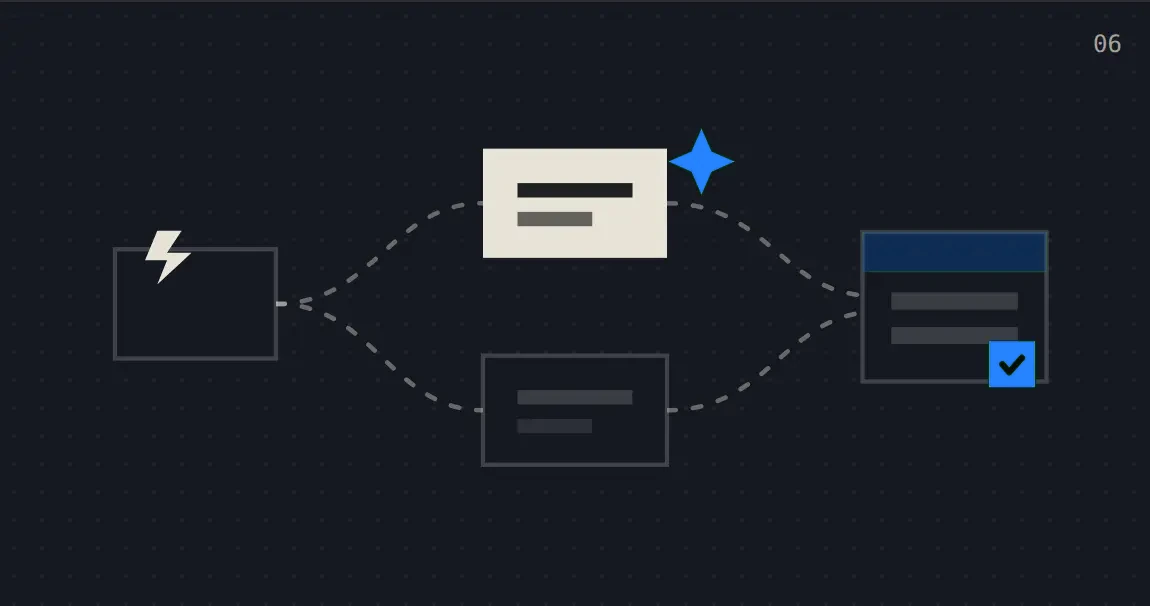
A run in progress on the node canvas — each node shows its own state rather than a single global spinner.
Typed nodes, and why colour is never the only signal
Nodes are typed — trigger, enrich, email, SMS, sheets, design — and node identity is carried by icon plus label plus colour, never colour alone.
That started as an accessibility requirement and turned out to be a usability one. In a graph of twenty nodes, colour alone is unreadable even with normal vision, because the palette runs out and adjacent hues blur at small sizes. Icon plus label survives screenshots, projector washout, and printing.
What we built
FlowForge is the demonstrator: flows built as typed nodes on a canvas, runs you can watch step by step, a run log with per-node telemetry, and integrations with one honest attention state. The canvas is hand-rolled SVG — typed nodes, bezier edges, run-order animation — with no graph library, which kept the rendering behaviour fully under our control.
As with the rest of the portfolio: this is a working demonstrator on generated trend data, not a production install running real customer flows. The canvas, the run engine and the telemetry are real; the six months of history is seeded. Being clear about that is more useful to you than implying otherwise.
Build vs buy
Honest guidance, since n8n, Make and Zapier exist and are good:
Use an existing tool when your flows are standard shapes (form → CRM → email), volumes are modest, and the integrations you need are already built. Do not pay for custom work to reproduce Zapier.
Build custom when the logic branches on your own business rules, when data cannot leave your environment, when you need per-step telemetry the tool will not give you, or when per-task pricing at your volume exceeds the cost of owning it.
Most of our automation work is a mix: an existing tool for the standard hops, custom code where the rules are specific. Purity is not a virtue here.
Honest limits
- Observability costs build time. A run log, retry semantics and alerting are real work. On a two-step flow it is over-engineering; past about five steps it pays for itself the first time something breaks.
- Automation encodes the current process. If the process is wrong you get a faster wrong process — which is why the audit comes before the build.
- Every integration is a standing maintenance commitment. Upstream APIs change without asking. Either budget for care or accept that something breaks in a year.
- Alert fatigue is a real failure mode. If everything alerts, nothing does. Alert on failures that need a human, not on every retry.
Related
- The same admin work, every day — which repetitive tasks are worth automating first
- When the owner cannot see what is happening — the same visibility argument applied to business state rather than flows
← Back to AI for owner-led service businesses